Count every box.
Enter each ball and let the app handle running totals, strikes, spares, and the candlepin tenth. Undo a roll when you need to.
THE CANDLEPIN BOWLING SCOREKEEPER
Keep your head in the game.
Keep the score in Candle Count.
Candle Count is a candlepin bowling scorekeeping app for iPhone and iPad. Record balls, keep your history, and share the final card with your local alley’s branding.
Download on theApp StoreFree · iPhone & iPad
AT THE LANES
Enter each ball and let the app handle running totals, strikes, spares, and the candlepin tenth. Undo a roll when you need to.
Find past games in your history. Already bowled on paper or an alley’s system? Log the finished score.
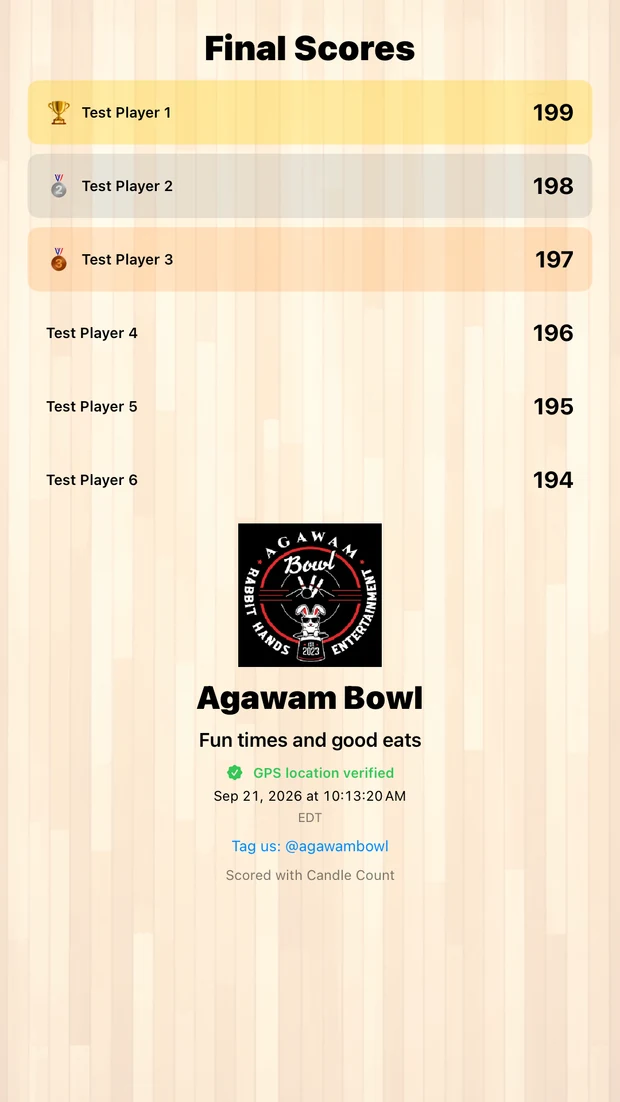
Share the final scores with the alley’s logo and message, plus the game’s date and location status.
THE GAME DOESN’T END AT BOX TEN
Keep the final standings and share the game with the people who were there. Alley branding gives your local lanes a place on the scorecard, too.
Location verification records where the game was played. It is separate from staff approval of a score.
A standard bowling-style scorecard and ball-by-ball entry, with one box per player per turn. A straightforward start for families, friends, and bowlers learning the game.
Choose one, two, three, or five boxes per turn. Use a candlepin paper card with ball-by-ball entry or box results, with bonuses calculated from following play.
The familiar setup and landscape scorecard, available from its own menu. Your existing saved games remain part of your scorebook.
ONLINE CLUBHOUSE · IN DEVELOPMENT
Choose a username. Submit your own 200+ game for an alley’s review. A confirmed score earns a separate alley-verified honor.
Ordinary games won’t need approval. Sharing will be optional, and your saved score stays yours.
For alley owners and staffNEXT TIME YOU HIT THE LANES
Get the current version of Candle Count for iPhone and iPad.
CANDLEPIN SCORING, EXPLAINED
Yes. Candle Count is a free candlepin bowling scorekeeping app for iPhone and iPad, built for one to six players. Enter each ball, keep saved scorecards and share final results.
Yes. Share the final card through the iOS share sheet, with the selected alley’s logo and promotional message, recorded date and location status.
They are previews of the next update. Quick Start uses a standard bowling-style card with one box per turn. Advanced uses a candlepin paper card with 1/2/3/5 box choices. The App Store listing describes the current release.
The familiar Candle Count Classic scorecard and saved local games remain available. The new account features do not automatically upload your Classic history.
ALSO FROM THEOBYTE APPS